
BPMN in BESSER.
BESSER turns BPMN into an explicit low-code model. Use BPMN 2.0.2 to describe workflows, collaborations, and orchestrations with pools, lanes, events, gateways, and message flows.
Model BPMN 2.0.2 processes with the full notation.
BESSER gives you the BPMN 2.0.2 notation for modeling real business processes. You can express workflows, collaborations, and orchestrations with pools and lanes, connect participants with message flows, and capture the events, tasks, and gateways that drive the process.
- Model workflows, collaborations, and orchestration scenarios
- Use pools and lanes to organize participants
- Capture events, tasks, gateways, and message flows explicitly
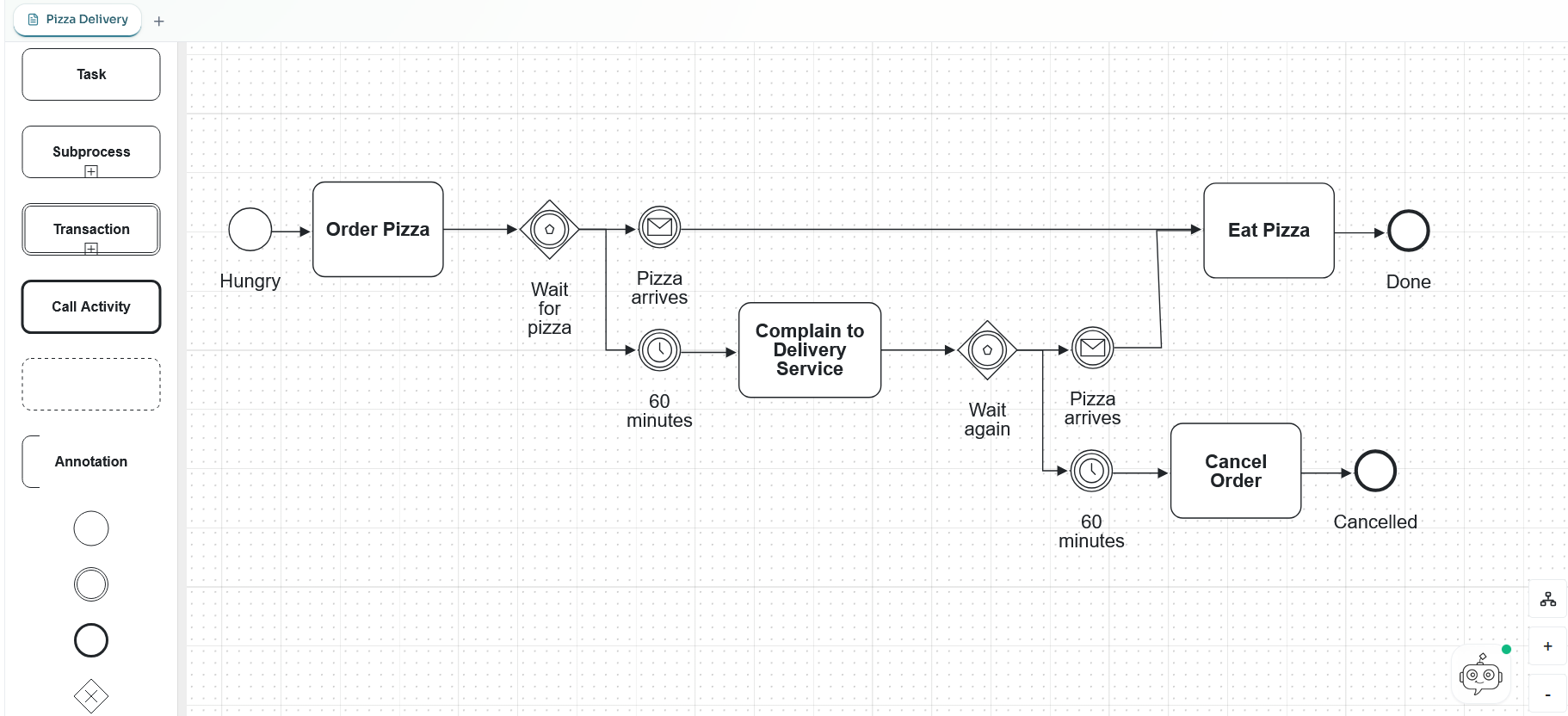
Import and export BPMN XML while preserving the model.
BESSER can import BPMN XML, preserve the structure in the metamodel, and export it again when you need to share the process with other BPMN tools. The code frame shows the XML generated from the diagram above.
- Bring external BPMN definitions into BESSER
- Inspect and evolve the process in the editor
- Export XML back to the BPMN ecosystem
<?xml version="1.0" encoding="UTF-8"?>
<definitions xmlns="http://www.omg.org/spec/BPMN/20100524/MODEL"
             xmlns:bpmndi="http://www.omg.org/spec/BPMN/20100524/DI"
             xmlns:dc="http://www.omg.org/spec/DD/20100524/DC"
             xmlns:di="http://www.omg.org/spec/DD/20100524/DI"
             id="Definitions_pizza_order"
             targetNamespace="https://besser-pearl.org/bpmn/pizza">
  <message id="Message_pizza_delivered" name="Pizza delivered" />

  <process id="Process_pizza_order" name="Pizza order" isExecutable="false">
    <startEvent id="StartEvent_hungry" name="Hungry" />
    <task id="Task_order_pizza" name="Order Pizza" />
    <eventBasedGateway id="Gateway_wait_for_pizza" name="Wait for pizza" />

    <intermediateCatchEvent id="Event_pizza_arrives_first" name="Pizza arrives">
      <messageEventDefinition id="MessageEvent_pizza_arrives_first" messageRef="Message_pizza_delivered" />
    </intermediateCatchEvent>

    <intermediateCatchEvent id="Event_first_timeout" name="60 minutes">
      <timerEventDefinition id="TimerEvent_first_timeout">
        <timeDuration>PT60M</timeDuration>
      </timerEventDefinition>
    </intermediateCatchEvent>

    <task id="Task_complain" name="Complain to Delivery Service" />
    <eventBasedGateway id="Gateway_wait_after_complaint" name="Wait again" />

    <intermediateCatchEvent id="Event_pizza_arrives_after_complaint" name="Pizza arrives">
      <messageEventDefinition id="MessageEvent_pizza_arrives_after_complaint" messageRef="Message_pizza_delivered" />
    </intermediateCatchEvent>

    <intermediateCatchEvent id="Event_second_timeout" name="60 minutes">
      <timerEventDefinition id="TimerEvent_second_timeout">
        <timeDuration>PT60M</timeDuration>
      </timerEventDefinition>
    </intermediateCatchEvent>

    <task id="Task_eat_pizza" name="Eat Pizza" />
    <task id="Task_cancel_order" name="Cancel Order" />
    <endEvent id="EndEvent_pizza_eaten" name="Done" />
    <endEvent id="EndEvent_order_cancelled" name="Cancelled" />

    <sequenceFlow id="Flow_1" sourceRef="StartEvent_hungry" targetRef="Task_order_pizza" />
    <sequenceFlow id="Flow_2" sourceRef="Task_order_pizza" targetRef="Gateway_wait_for_pizza" />
    <sequenceFlow id="Flow_3" sourceRef="Gateway_wait_for_pizza" targetRef="Event_pizza_arrives_first" />
    <sequenceFlow id="Flow_4" sourceRef="Event_pizza_arrives_first" targetRef="Task_eat_pizza" />
    <sequenceFlow id="Flow_5" sourceRef="Gateway_wait_for_pizza" targetRef="Event_first_timeout" />
    <sequenceFlow id="Flow_6" sourceRef="Event_first_timeout" targetRef="Task_complain" />
    <sequenceFlow id="Flow_7" sourceRef="Task_complain" targetRef="Gateway_wait_after_complaint" />
    <sequenceFlow id="Flow_8" sourceRef="Gateway_wait_after_complaint" targetRef="Event_pizza_arrives_after_complaint" />
    <sequenceFlow id="Flow_9" sourceRef="Event_pizza_arrives_after_complaint" targetRef="Task_eat_pizza" />
    <sequenceFlow id="Flow_10" sourceRef="Gateway_wait_after_complaint" targetRef="Event_second_timeout" />
    <sequenceFlow id="Flow_11" sourceRef="Event_second_timeout" targetRef="Task_cancel_order" />
    <sequenceFlow id="Flow_12" sourceRef="Task_eat_pizza" targetRef="EndEvent_pizza_eaten" />
    <sequenceFlow id="Flow_13" sourceRef="Task_cancel_order" targetRef="EndEvent_order_cancelled" />
  </process>

  <bpmndi:BPMNDiagram id="Diagram_pizza_order">
    <bpmndi:BPMNPlane id="Plane_pizza_order" bpmnElement="Process_pizza_order">
      <bpmndi:BPMNShape id="StartEvent_hungry_di" bpmnElement="StartEvent_hungry">
        <dc:Bounds x="24" y="118" width="36" height="36" />
      </bpmndi:BPMNShape>
      <bpmndi:BPMNShape id="Task_order_pizza_di" bpmnElement="Task_order_pizza">
        <dc:Bounds x="95" y="96" width="110" height="80" />
      </bpmndi:BPMNShape>
      <bpmndi:BPMNShape id="Gateway_wait_for_pizza_di" bpmnElement="Gateway_wait_for_pizza">
        <dc:Bounds x="270" y="111" width="50" height="50" />
      </bpmndi:BPMNShape>
      <bpmndi:BPMNShape id="Event_pizza_arrives_first_di" bpmnElement="Event_pizza_arrives_first">
        <dc:Bounds x="370" y="118" width="36" height="36" />
      </bpmndi:BPMNShape>
      <bpmndi:BPMNShape id="Event_first_timeout_di" bpmnElement="Event_first_timeout">
        <dc:Bounds x="370" y="220" width="36" height="36" />
      </bpmndi:BPMNShape>
      <bpmndi:BPMNShape id="Task_complain_di" bpmnElement="Task_complain">
        <dc:Bounds x="455" y="198" width="120" height="80" />
      </bpmndi:BPMNShape>
      <bpmndi:BPMNShape id="Gateway_wait_after_complaint_di" bpmnElement="Gateway_wait_after_complaint">
        <dc:Bounds x="640" y="213" width="50" height="50" />
      </bpmndi:BPMNShape>
      <bpmndi:BPMNShape id="Event_pizza_arrives_after_complaint_di" bpmnElement="Event_pizza_arrives_after_complaint">
        <dc:Bounds x="735" y="220" width="36" height="36" />
      </bpmndi:BPMNShape>
      <bpmndi:BPMNShape id="Event_second_timeout_di" bpmnElement="Event_second_timeout">
        <dc:Bounds x="735" y="322" width="36" height="36" />
      </bpmndi:BPMNShape>
      <bpmndi:BPMNShape id="Task_eat_pizza_di" bpmnElement="Task_eat_pizza">
        <dc:Bounds x="820" y="96" width="110" height="80" />
      </bpmndi:BPMNShape>
      <bpmndi:BPMNShape id="Task_cancel_order_di" bpmnElement="Task_cancel_order">
        <dc:Bounds x="820" y="300" width="110" height="80" />
      </bpmndi:BPMNShape>
      <bpmndi:BPMNShape id="EndEvent_pizza_eaten_di" bpmnElement="EndEvent_pizza_eaten">
        <dc:Bounds x="975" y="118" width="36" height="36" />
      </bpmndi:BPMNShape>
      <bpmndi:BPMNShape id="EndEvent_order_cancelled_di" bpmnElement="EndEvent_order_cancelled">
        <dc:Bounds x="975" y="322" width="36" height="36" />
      </bpmndi:BPMNShape>

      <bpmndi:BPMNEdge id="Flow_1_di" bpmnElement="Flow_1"><di:waypoint x="60" y="136" /><di:waypoint x="95" y="136" /></bpmndi:BPMNEdge>
      <bpmndi:BPMNEdge id="Flow_2_di" bpmnElement="Flow_2"><di:waypoint x="205" y="136" /><di:waypoint x="270" y="136" /></bpmndi:BPMNEdge>
      <bpmndi:BPMNEdge id="Flow_3_di" bpmnElement="Flow_3"><di:waypoint x="320" y="136" /><di:waypoint x="370" y="136" /></bpmndi:BPMNEdge>
      <bpmndi:BPMNEdge id="Flow_4_di" bpmnElement="Flow_4"><di:waypoint x="406" y="136" /><di:waypoint x="820" y="136" /></bpmndi:BPMNEdge>
      <bpmndi:BPMNEdge id="Flow_5_di" bpmnElement="Flow_5"><di:waypoint x="295" y="161" /><di:waypoint x="295" y="238" /><di:waypoint x="370" y="238" /></bpmndi:BPMNEdge>
      <bpmndi:BPMNEdge id="Flow_6_di" bpmnElement="Flow_6"><di:waypoint x="406" y="238" /><di:waypoint x="455" y="238" /></bpmndi:BPMNEdge>
      <bpmndi:BPMNEdge id="Flow_7_di" bpmnElement="Flow_7"><di:waypoint x="575" y="238" /><di:waypoint x="640" y="238" /></bpmndi:BPMNEdge>
      <bpmndi:BPMNEdge id="Flow_8_di" bpmnElement="Flow_8"><di:waypoint x="690" y="238" /><di:waypoint x="735" y="238" /></bpmndi:BPMNEdge>
      <bpmndi:BPMNEdge id="Flow_9_di" bpmnElement="Flow_9"><di:waypoint x="771" y="238" /><di:waypoint x="875" y="238" /><di:waypoint x="875" y="176" /></bpmndi:BPMNEdge>
      <bpmndi:BPMNEdge id="Flow_10_di" bpmnElement="Flow_10"><di:waypoint x="665" y="263" /><di:waypoint x="665" y="340" /><di:waypoint x="735" y="340" /></bpmndi:BPMNEdge>
      <bpmndi:BPMNEdge id="Flow_11_di" bpmnElement="Flow_11"><di:waypoint x="771" y="340" /><di:waypoint x="820" y="340" /></bpmndi:BPMNEdge>
      <bpmndi:BPMNEdge id="Flow_12_di" bpmnElement="Flow_12"><di:waypoint x="930" y="136" /><di:waypoint x="975" y="136" /></bpmndi:BPMNEdge>
      <bpmndi:BPMNEdge id="Flow_13_di" bpmnElement="Flow_13"><di:waypoint x="930" y="340" /><di:waypoint x="975" y="340" /></bpmndi:BPMNEdge>
    </bpmndi:BPMNPlane>
  </bpmndi:BPMNDiagram>
</definitions>What makes the BPMN extension useful in BESSER.
The extension defines BPMN as a language in B-UML and provides XML interchange with DI, alongside validation that keeps models structurally sound.
See BPMN editing in action.
This walkthrough shows the BPMN editor in BESSER: model the process, inspect the layout, and keep the diagram ready for BPMN XML export.