
Features · Quantum circuits
Quantum Circuit modeling in BESSER.
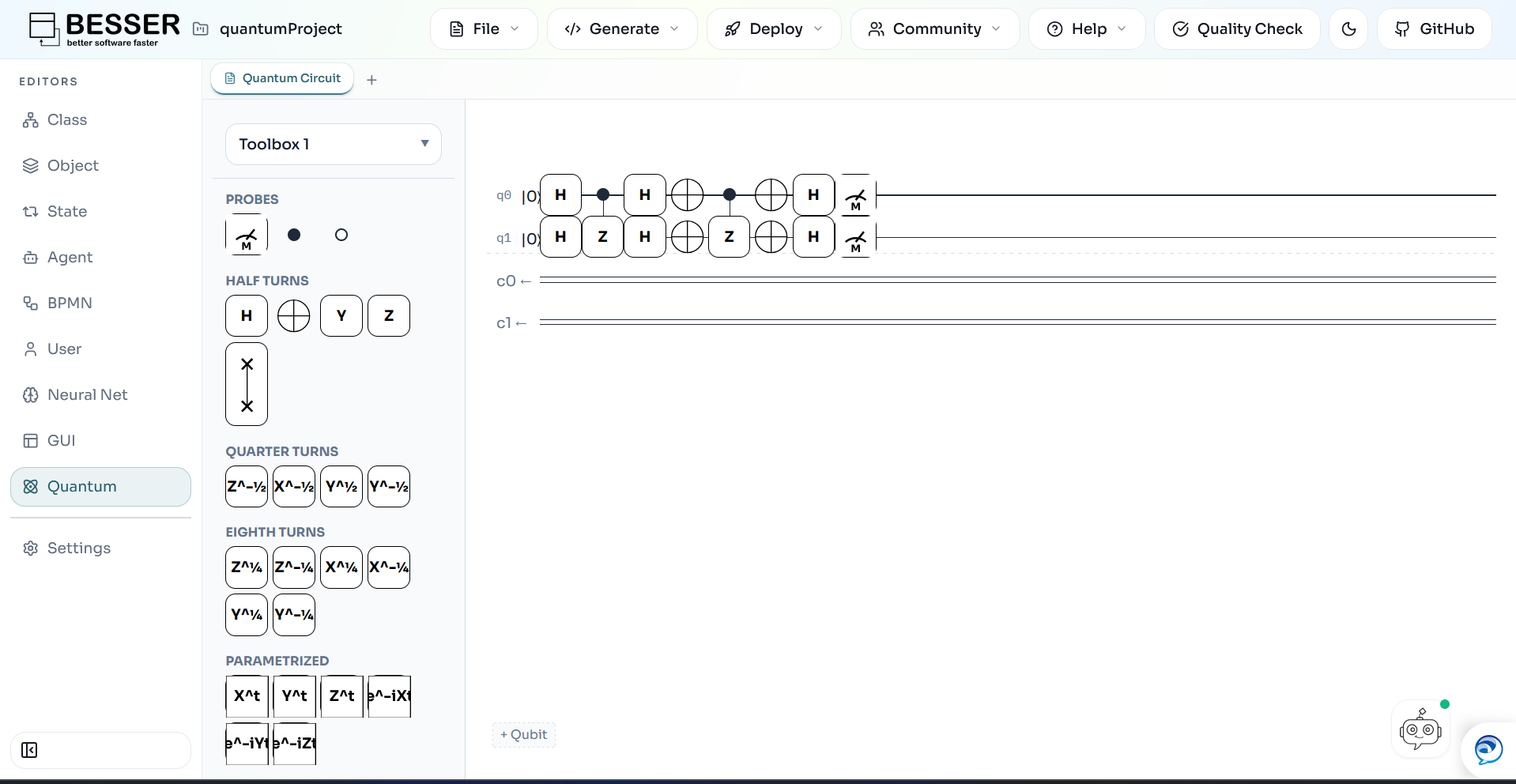
Model and generate quantum circuits within the same BESSER low-code workflow. Define your circuit, validate it, and generate runnable Qiskit code targeting local simulation, noise-aware testing, or real IBM Quantum hardware at the click of a button.
editor.besser-pearl.org — quantum circuit canvas
See it in action
One model. Three outputs.
The same quantum circuit shown above, implemented as executable Qiskit code: local Aer simulation (left), local simulation with mock noise/error models (center), and execution on real IBM Quantum hardware (right).
aer_simulation.py
import sys
import os
sys.path = [p.strip() for p in sys.path if p]
from qiskit import QuantumCircuit, QuantumRegister, ClassicalRegister, transpile
from qiskit.circuit import Instruction
from qiskit_aer import AerSimulator
from qiskit.circuit.library import *

# Initialize Registers

q = QuantumRegister(2, 'q')
c = ClassicalRegister(2, 'c')

# Initialize Circuit
qc = QuantumCircuit(q, c)
# Operations
qc.append(HGate(), [q[0]])
qc.append(HGate(), [q[1]])
qc.append(ZGate().control(1, ctrl_state='1'), [q[0], q[1]])
qc.append(HGate(), [q[0]])
qc.append(HGate(), [q[1]])
qc.append(XGate(), [q[0]])
qc.append(XGate(), [q[1]])
qc.append(ZGate().control(1, ctrl_state='1'), [q[0], q[1]])
qc.append(XGate(), [q[0]])
qc.append(XGate(), [q[1]])
qc.append(HGate(), [q[0]])
qc.append(HGate(), [q[1]])
qc.measure(q[0], c[0])
qc.measure(q[1], c[1])
# Draw
print(qc.draw())
# Execution (Local Aer Simulator)
print("Simulating circuit with Aer Simulator...")
simulator = AerSimulator()
transpiled_qc = transpile(qc, simulator)
result = simulator.run(transpiled_qc, shots=1024).result()
counts = result.get_counts()
print("Counts:", counts)noise_simulator.py
import sys
import os
sys.path = [p.strip() for p in sys.path if p]
from qiskit import QuantumCircuit, QuantumRegister, ClassicalRegister, transpile
from qiskit.circuit import Instruction
from qiskit_aer import AerSimulator
from qiskit_ibm_runtime.fake_provider import FakeManilaV2
from qiskit.circuit.library import *

# Initialize Registers

q = QuantumRegister(2, 'q')
c = ClassicalRegister(2, 'c')

# Initialize Circuit
qc = QuantumCircuit(q, c)
# Operations
qc.append(HGate(), [q[0]])
qc.append(HGate(), [q[1]])
qc.append(ZGate().control(1, ctrl_state='1'), [q[0], q[1]])
qc.append(HGate(), [q[0]])
qc.append(HGate(), [q[1]])
qc.append(XGate(), [q[0]])
qc.append(XGate(), [q[1]])
qc.append(ZGate().control(1, ctrl_state='1'), [q[0], q[1]])
qc.append(XGate(), [q[0]])
qc.append(XGate(), [q[1]])
qc.append(HGate(), [q[0]])
qc.append(HGate(), [q[1]])
qc.measure(q[0], c[0])
qc.measure(q[1], c[1])
# Draw
print(qc.draw())
# Execution (Fake Backend - simulates real hardware noise)
print("Simulating circuit with Fake Backend (FakeManilaV2)...")
fake_backend = FakeManilaV2()
# Note: Fake backends simulate noise characteristics of real hardware
transpiled_qc = transpile(qc, fake_backend)
simulator = AerSimulator.from_backend(fake_backend)
result = simulator.run(transpiled_qc, shots=1024).result()
counts = result.get_counts()
print("Counts:", counts)ibm_hardware.py
import sys
import os
sys.path = [p.strip() for p in sys.path if p]
from qiskit import QuantumCircuit, QuantumRegister, ClassicalRegister, transpile
from qiskit.circuit import Instruction
from qiskit_ibm_runtime import QiskitRuntimeService, SamplerV2 as Sampler
from qiskit.circuit.library import *

# Initialize Registers

q = QuantumRegister(2, 'q')
c = ClassicalRegister(2, 'c')


# Initialize Circuit
qc = QuantumCircuit(q, c)
# Operations

qc.append(HGate(), [q[0]])
qc.append(HGate(), [q[1]])
qc.append(ZGate().control(1, ctrl_state='1'), [q[0], q[1]])
qc.append(HGate(), [q[0]])
qc.append(HGate(), [q[1]])
qc.append(XGate(), [q[0]])
qc.append(XGate(), [q[1]])
qc.append(ZGate().control(1, ctrl_state='1'), [q[0], q[1]])
qc.append(XGate(), [q[0]])
qc.append(XGate(), [q[1]])
qc.append(HGate(), [q[0]])
qc.append(HGate(), [q[1]])
qc.measure(q[0], c[0])
qc.measure(q[1], c[1])

# Draw
print(qc.draw())
# Execution (IBM Quantum Hardware)
print("Running circuit on IBM Quantum Hardware...")
# Initialize the service (requires IBMQ account setup)
# To save your credentials: QiskitRuntimeService.save_account(channel="ibm_quantum", token="YOUR_TOKEN")
service = QiskitRuntimeService()

# Get the least busy backend that can handle this circuit
backend = service.least_busy(operational=True, simulator=False, min_num_qubits=qc.num_qubits)
print(f"Using backend: {backend.name}")

# Transpile for the target backend
transpiled_qc = transpile(qc, backend)

# Run using the Sampler primitive
sampler = Sampler(mode=backend)
job = sampler.run([transpiled_qc], shots=1024)
print(f"Job ID: {job.job_id()}")

# Wait for results
result = job.result()
# Get quasi-distribution from the first pub result
pub_result = result[0]
counts = pub_result.data.c.get_counts()
print("Counts:", counts)
Capabilities
Everything you need to model a quantum circuit.
Walkthrough
Watch it end to end
Build a quantum circuit on the canvas, then generate runnable Qiskit code targeting local AER simulation or real IBM Quantum hardware.
editor.besser-pearl.org — model → generate