Features · Knowledge Graphs

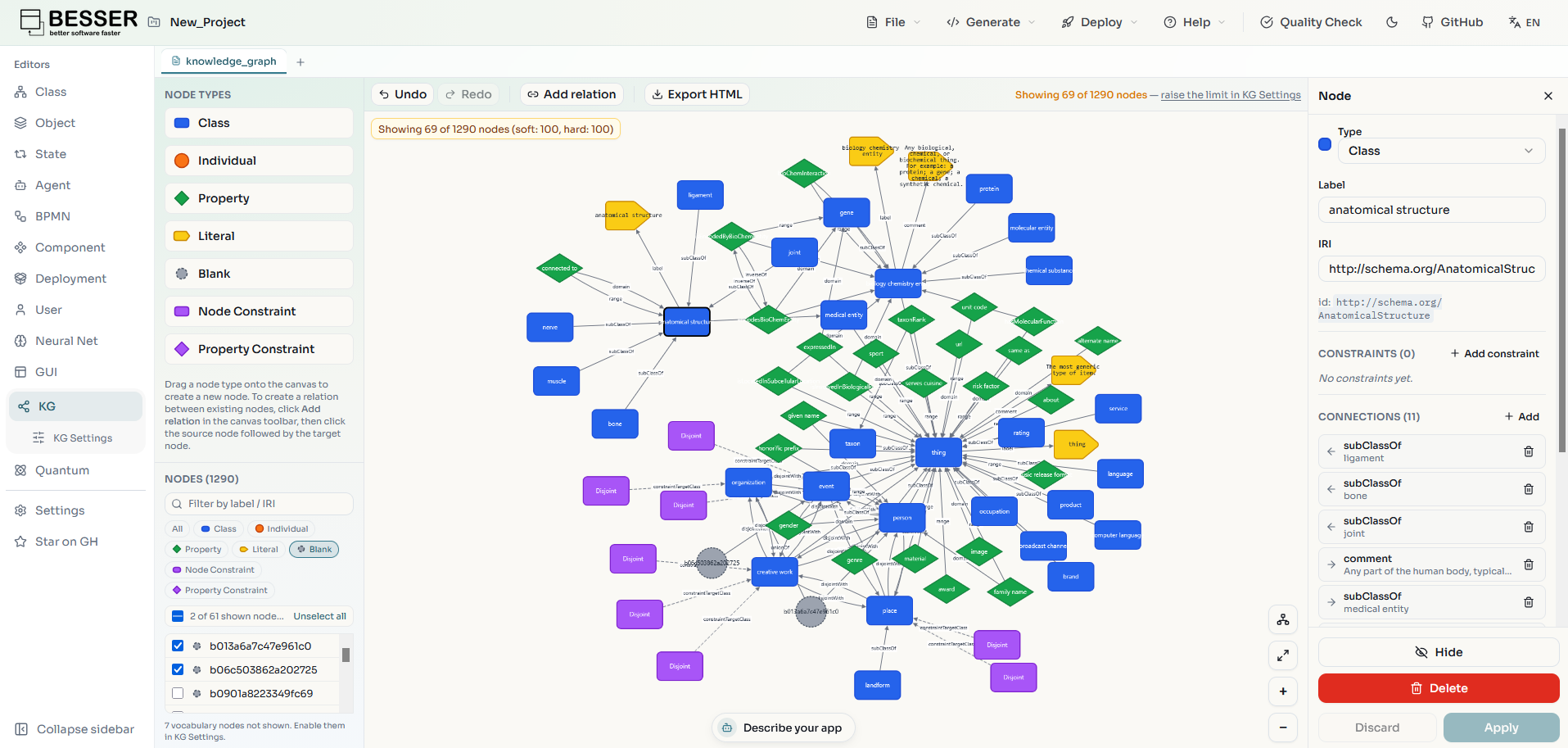
The BESSER Knowledge Graph editor.

Draw, import, and refine knowledge graphs in the same web editor you use for the rest of your models, then turn them into a UML class diagram, with OCL constraints, automatically. Ontologies stop being a side artifact and join the model-driven workflow.

Prefer to watch? Jump to the walkthrough
editor.besser-pearl.org
BESSER knowledge graph editor
Explore and edit a knowledge graph on the BESSER Web Modeling Editor canvas.
Capabilities

Everything you need to work with a knowledge graph.

From a drawn or imported graph to a validated UML model with constraints, quality checks, and standard RDF formats along the way.

Graph to UML

Your graph becomes a class diagram.

Convert a knowledge graph and BESSER generates the matching UML class diagram for you — classes, generalizations, attributes, associations, and enumerations, with OCL invariants for the rules UML cannot draw. Same domain, two views, no manual re-modeling.

Knowledge graph
editor.besser-pearl.org
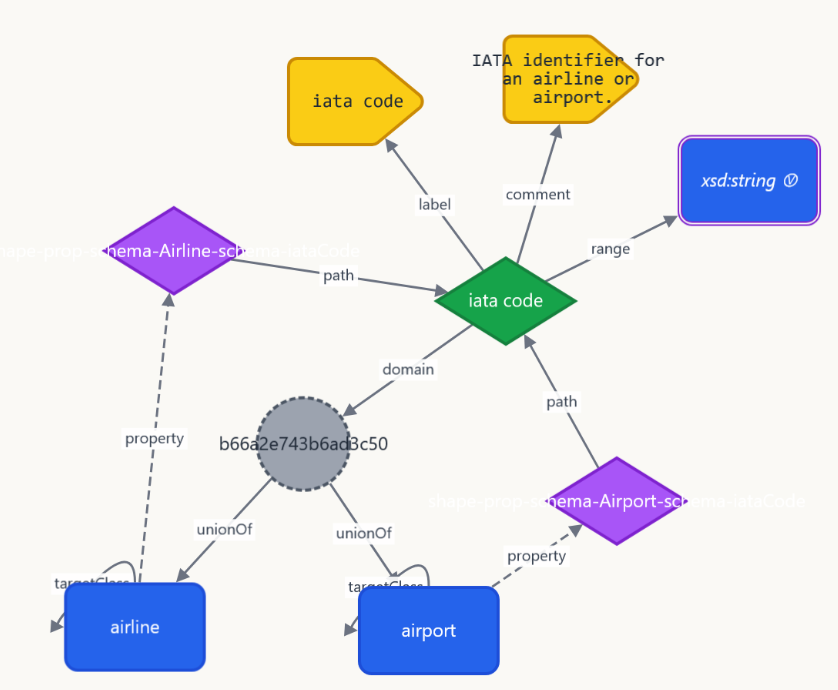
Knowledge graph in the BESSER editor: an iata code property with Airline and Airport as its domain, constrained by SHACL property shapes
Before: a shared iata code property on Airline and Airport, with SHACL property shapes.
UML class diagram
editor.besser-pearl.org
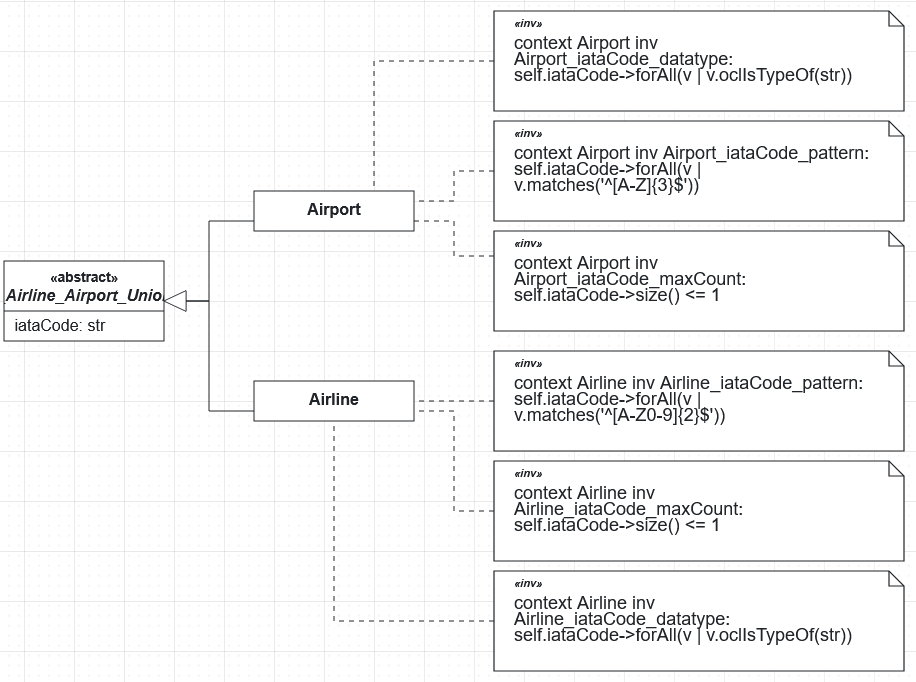
UML class diagram generated from the knowledge graph: an abstract union class with an iataCode attribute, Airline and Airport subclasses, and OCL invariants
After: an abstract superclass with the shared attribute, two subclasses, and OCL invariants from the shapes.
Walkthrough

Watch it end to end

Import an ontology, refine the graph, and get the UML class diagram — in one short take.

KG editor — graph → UML

Model knowledge graphs visually

The Knowledge Graph is a first-class diagram type in the BESSER Web Modeling Editor. Typed nodes — classes, individuals, properties, literals, blank nodes, and constraints — are joined by directed, labelled edges, so you can sketch a domain the way you would on a whiteboard and keep it as a real model.

  • Seven node kinds: class, individual, property, literal, blank node, node and property constraints
  • Directed, labelled edges between any nodes
  • Lives next to your class, state-machine, and agent models

Import and export OWL and SHACL

You do not have to start from scratch. Import an existing OWL or Turtle ontology, together with its SHACL shapes, straight into the editor and it opens as a graph you can explore and edit. When you are done, export to Turtle or RDF/XML, with OWL restrictions, SHACL shapes, or both, or export the visualization as a standalone HTML file to share.

  • Import OWL / Turtle ontologies, including their SHACL shapes
  • Export Turtle or RDF/XML — OWL restrictions, SHACL shapes, or both
  • Share the graph as a standalone HTML visualization

OWL 2 and SHACL constraints

Constraints are part of the graph, not an afterthought. OWL restrictions and SHACL shapes are represented as constraint nodes attached to the classes and properties they govern, and the converter translates them into OCL invariants on the generated UML model, so the rules survive the move to software.

  • OWL restrictions and SHACL node / property shapes as constraint nodes
  • Axioms such as equivalence, disjointness, property chains, and keys
  • Translated to OCL invariants in the UML model

Check and refine

Real ontologies are rarely complete. Our integrated quality check reports what is ambiguous — a property with no domain, a class that is referenced but never declared — and recommends resolutions you can apply from the refinement dialog. If you want a hand, an LLM can propose cleanups too.

  • Spot missing domains and undeclared classes early
  • Apply recommended resolutions from the editor
  • Optional LLM-assisted refinement, always under your control

Deterministic KG-to-UML

The conversion is rule-based, not a black box: classes, subclassing, attributes, associations, enumerations, and cardinalities map to UML constructs, and everything that UML cannot express directly becomes an OCL invariant. Identical input always produces an identical model, and any construct that could not be translated is reported as a warning rather than silently dropped. The conversion covers the schema level (classes and properties), not individual instances.

  • Rule-based and reproducible
  • Warnings for every construct that was merged or dropped
  • Schema-level conversion: classes, properties, and constraints

From ontology to software

The class diagram is the bridge between your ontology and running code. The graph is converted into a UML class diagram with OCL constraints, which is an ordinary BESSER model: refine it, validate it, and hand it to any BESSER generator — databases, REST APIs, web apps and more. Because the OCL invariants come from your OWL restrictions and SHACL shapes, the rules you wrote in the ontology can be enforced in the generated code too. Knowledge graphs also round-trip through B-UML, so they travel with the rest of your project.

  • Ontology → UML class diagram → generated code
  • Refine the generated class diagram like any other model
  • OWL and SHACL rules become OCL invariants that carry into the code
  • Round-trip graphs through B-UML and project export